Map-first launcher with integrated travel tools for Android
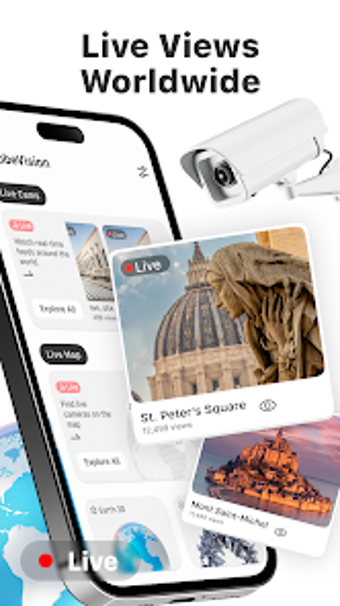
GlobeVision: Live Maps by SHIMUL JEWELLERS turns your Android home screen into a map-focused launch point, suited to travelers and geography fans. The app bundles map exploration, virtual landmark previews, and a set of travel utilities under a single launcher surface, so discovery and daily tools appear on the device front page. It offers satellite imagery and interactive place pages alongside utilities such as clocks and converters. The design targets users who prefer immediate access to location-based features.
Launcher mode changes how you access apps and requires deliberate setup
GlobeVision installs as a home-screen launcher, which shifts shortcuts and the device front page toward location features. Users must designate it as the default launcher during setup, and the system settings provide a path to restore the previous home screen if they prefer the original layout. That installation model makes the map interface the centre of daily navigation rather than an occasional app you open from an app drawer.
Live maps and 360 content depend on a network connection
Because the tool loads live maps, satellite imagery, and 360-degree previews from online sources, an active network connection is required for those elements while some basic utilities may operate offline. High-resolution imagery and live camera pages incur noticeable data transfer during extended use. Expect smoother browsing on Wi-Fi and potential interruptions when network quality drops or is metered.
Permissions enable features but require user review
The app requests Location, Camera, and Network permissions to deliver place-focused services and live visual previews; Camera access specifically supports 360 viewing and live camera pages where available. Users should review these scopes before activating the launcher because those permissions are necessary for interactive elements. The developer produces several utility apps, which indicates this is a purpose-built tool from a small studio rather than a large platform provider.
Built-in utilities fit quick travel checks while deeper tours reward exploration
GlobeVision groups practical travel tools with its discovery features, providing a compact set of helpers for routine use and a pathway into virtual tourism. The integrated suite includes:
- Compass, world clock, speedometer
- Currency converter, translator
Casual users benefit from simple lookups, while users who enjoy virtual landmark pages and 360 previews gain the most; adapting to a launcher-driven workflow requires a short familiarization period.
GlobeVision is a focused choice for map-first users with clear trade-offs
GlobeVision suits users who prioritize immediate access to location tools and virtual place pages, offering a single interface for travel-oriented tasks. The trade-offs are the launcher takeover and the app’s reliance on camera, location, and network permissions. Try it briefly as a secondary launcher and use Wi-Fi for heavy imagery sessions. It performs well as a dedicated exploration shell for Android devices used primarily for navigation and discovery. Recommended.